Beginner to Advanced Guide to Cloud Computing: A Complete Learning Roadmap for 2026
Introduction
Cloud computing has become an important part of the modern IT industry. Businesses use cloud technology to store data, host websites, run applications, manage servers, and improve their IT infrastructure without depending entirely on physical hardware.
For students and beginners who want to build a career in IT, cloud computing offers an exciting learning path. Whether you are a college student, a fresher, or an IT professional looking to upgrade your skills, learning cloud computing can help you explore different career opportunities.
In this guide, we will explain how to start learning cloud computing from the basics and gradually move towards advanced concepts.
What Is Cloud Computing?
Cloud computing is the delivery of computing services over the internet. These services include servers, storage, databases, networking, software, and security tools.
Instead of purchasing and maintaining all the hardware themselves, businesses can use cloud platforms to access computing resources when required.
For example, when you store files in Google Drive or use an online application, cloud technology helps make these services available over the internet.
Popular cloud platforms include Amazon Web Services (AWS), Microsoft Azure, and Google Cloud.
Why Should You Learn Cloud Computing in 2026?
Cloud computing is used across industries, including education, healthcare, banking, e-commerce, software development, and cybersecurity.
Here are some reasons to learn cloud computing:
-
Industry relevance: Understand technologies used by modern businesses.
-
Multiple career paths: Explore cloud support, cloud administration, cloud engineering, and cloud security.
-
Practical IT skills: Learn about servers, networking, storage, and infrastructure.
-
Continuous learning: Build knowledge of automation, monitoring, containers, and cloud security.
-
Career development: Strengthen your IT foundation and prepare for relevant entry-level opportunities.
Remember that career opportunities depend on your practical skills, experience, qualifications, and the requirements of employers.
Step 1: Learn the Fundamentals of IT
Before learning advanced cloud technologies, understand the basics of computers and IT infrastructure.
Start with these topics:
-
Computer hardware and operating systems
-
Basic networking concepts
-
IP addresses, DNS, DHCP, and subnetting
-
Windows and Linux fundamentals
-
Servers, storage, and virtualization
-
Basic command-line operations
These concepts will help you understand how cloud infrastructure works.
Step 2: Understand the Types of Cloud Computing
Cloud computing environments are commonly divided into three types.
1. Public Cloud
Public cloud services are provided over the internet by cloud providers. AWS, Microsoft Azure, and Google Cloud offer public cloud services.
2. Private Cloud
A private cloud environment is dedicated to a single organization. It may be hosted within the organization's infrastructure or by a service provider.
3. Hybrid Cloud
A hybrid cloud combines private infrastructure with public cloud services, allowing organizations to use both environments.
Understanding these models will help you learn how businesses choose and manage cloud infrastructure.
 Step 3: Learn the Cloud Service Models
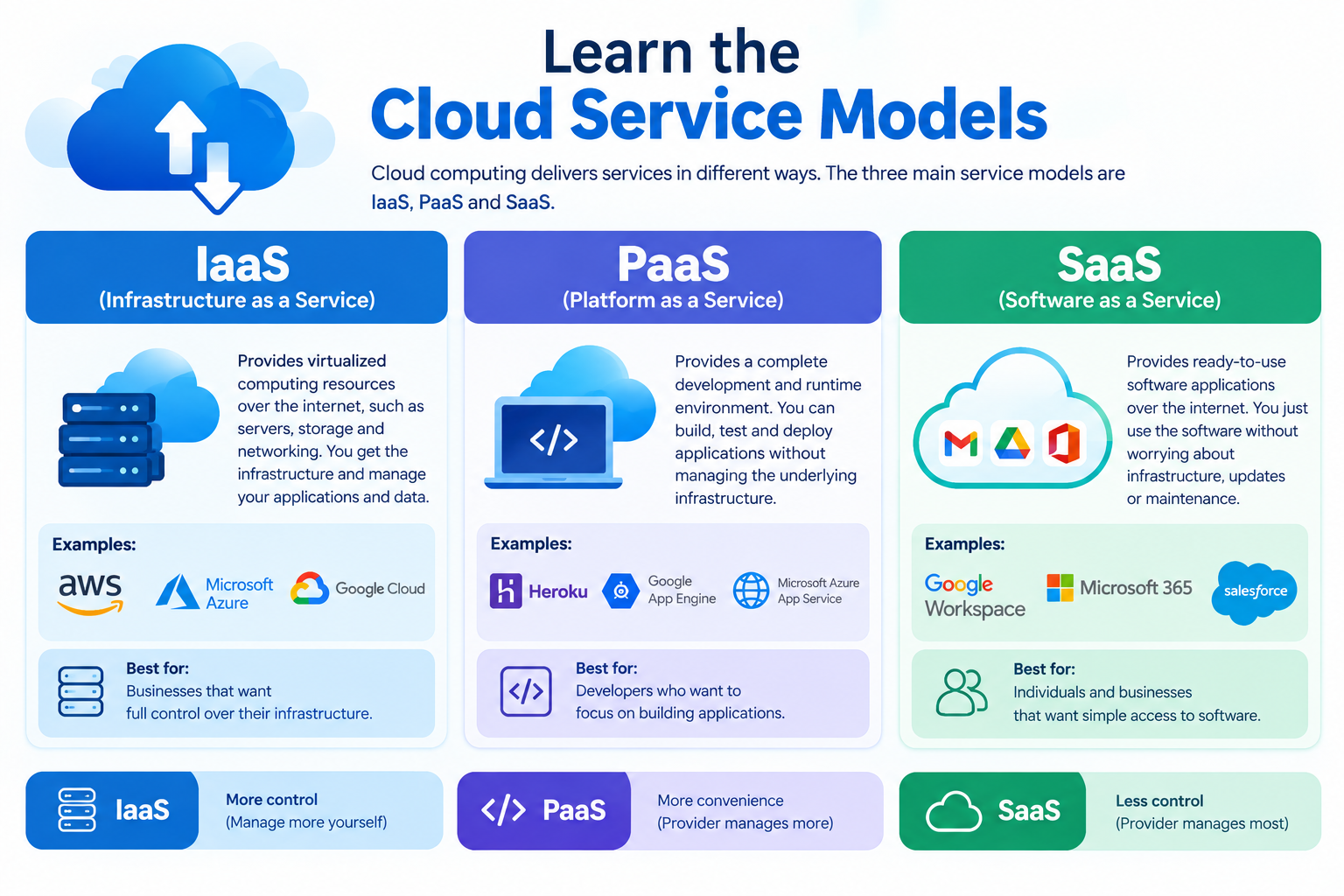
Cloud services are commonly grouped into three models.
Infrastructure as a Service (IaaS)
IaaS provides computing resources such as virtual machines, storage, and networking. Users can configure these resources according to their needs.
Platform as a Service (PaaS)
PaaS provides a platform for developing, testing, and deploying applications without managing every part of the underlying infrastructure.
Software as a Service (SaaS)
SaaS provides software applications over the internet. Examples include web-based email and online office applications.
Learning these models will help you understand how cloud services are delivered to users and businesses.
Step 4: Choose a Cloud Platform
Beginners do not need to learn every cloud platform at once. Start with one platform and develop a strong foundation.
Amazon Web Services (AWS)
AWS provides services for computing, storage, networking, databases, monitoring, and security.
Microsoft Azure
Azure offers cloud infrastructure and services for organizations, including businesses that use Microsoft technologies and enterprise environments.
Google Cloud
Google Cloud provides infrastructure, data analytics, application development, and other cloud services.
Beginner tip: Explore the official learning resources of one provider first. After understanding the fundamentals, you can compare other platforms.
Step 5: Develop Practical Cloud Skills
Reading theory alone is not enough. Hands-on practice helps you understand how cloud services work.
Try these beginner-friendly projects:
-
Create an account with a cloud provider and explore its learning environment.
-
Launch a virtual machine using an eligible free or low-cost option.
-
Create cloud storage and upload a sample file.
-
Configure basic access permissions.
-
Set up a simple website in a suitable cloud environment.
-
Learn to monitor resource usage and configure a budget alert.
Always check the provider's current pricing, free-tier conditions, and regional availability before creating resources. Delete resources when they are no longer needed to avoid unexpected charges.
Step 6: Learn Linux, Networking, and Cloud Security
Many cloud roles require knowledge beyond the cloud platform itself.
Linux
Learn basic Linux commands, file permissions, user management, package installation, and service management.
Networking
Study virtual networks, subnets, routing, firewalls, DNS, VPNs, and network access controls.
Cloud Security
Understand identity and access management, multi-factor authentication, encryption, secure configurations, backups, and monitoring.
These skills can help you troubleshoot infrastructure problems and understand how to protect cloud environments.
Step 7: Explore Advanced Cloud Technologies
After building a strong foundation, explore advanced topics according to your career goals.
-
Infrastructure as Code: Learn how tools such as Terraform help automate infrastructure deployment.
-
Containers: Understand Docker and container fundamentals.
-
Container orchestration: Explore Kubernetes when you are comfortable with containers.
-
DevOps: Learn automation, version control, CI/CD pipelines, and deployment workflows.
-
Cloud monitoring: Understand logs, metrics, alerts, and performance monitoring.
-
Cloud architecture: Study availability, scalability, reliability, and cost optimization.
You do not need to master all these topics at the beginning. Progress step by step and focus on the skills relevant to your chosen role.
Step 8: Prepare for Cloud Certifications
Certifications can help demonstrate your knowledge, but practical skills are equally important.
Depending on your chosen platform, you can explore introductory and associate-level certifications from AWS, Microsoft Azure, or Google Cloud.
Before paying for an exam, check the official certification website for the latest exam objectives, fees, prerequisites, and available learning resources.
A good preparation strategy includes studying the official syllabus, practising with labs, revising important concepts, and attempting practice questions.
Cloud Computing Career Opportunities
After developing relevant skills, you can explore roles such as:
-
Cloud Support Associate
-
Cloud Operations Engineer
-
Junior Cloud Administrator
-
Cloud Engineer
-
Cloud Security Analyst
-
DevOps Engineer
Some roles require prior IT experience or additional technical knowledge. Beginners can improve their readiness by building practical projects, documenting their work, and developing troubleshooting skills.
 A Simple 6-Month Cloud Computing Learning Roadmap
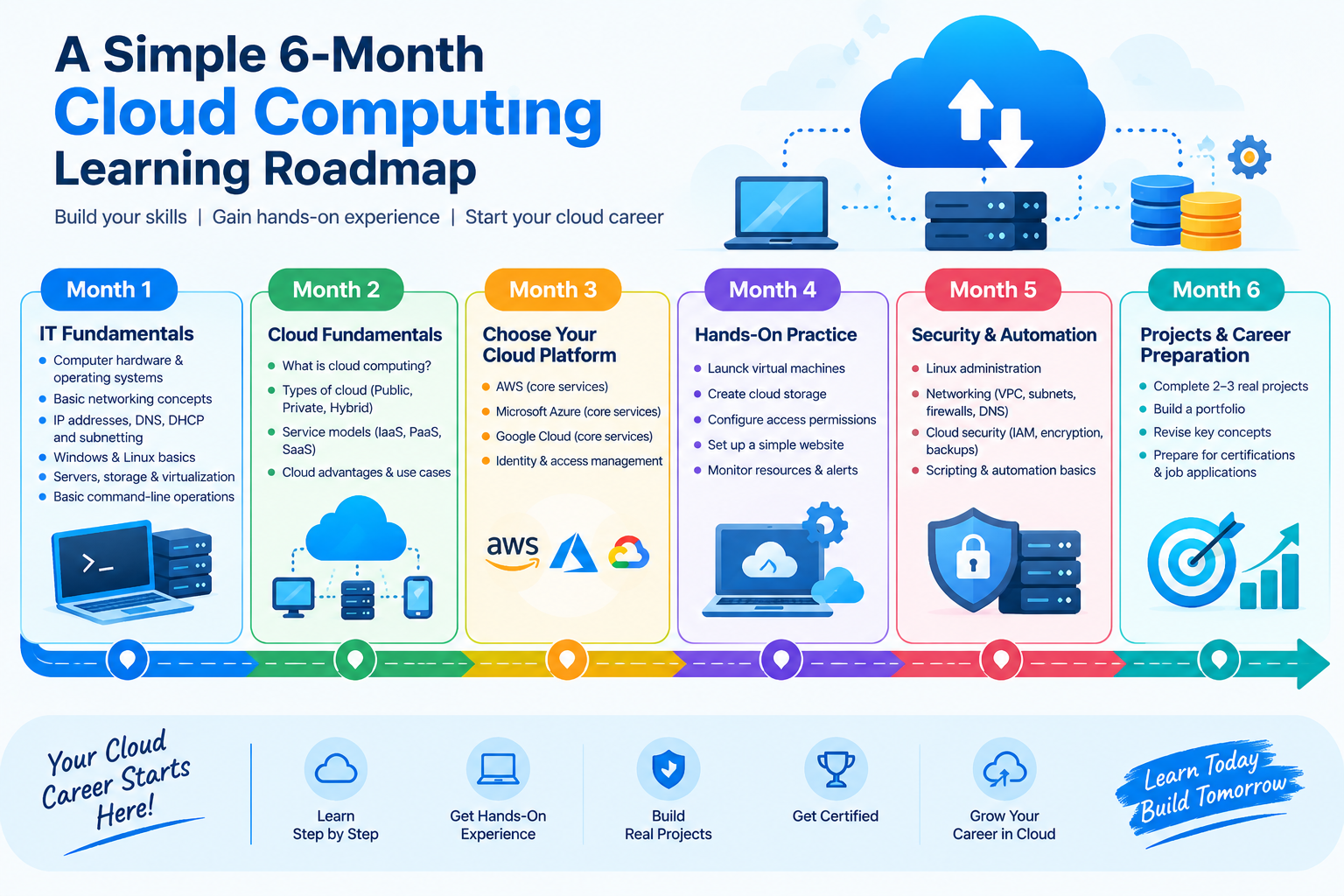
Here is an example roadmap for beginners. You can adjust it according to your available time and existing knowledge.
Month 1: IT Fundamentals
Learn networking basics, operating systems, hardware, servers, and virtualization.
Month 2: Cloud Fundamentals
Understand cloud computing, deployment models, service models, and the major cloud providers.
Month 3: Choose Your Cloud Platform
Study core services related to virtual machines, storage, networking, and identity management.
Month 4: Hands-On Practice
Build small projects, configure access permissions, practise monitoring, and learn basic troubleshooting.
Month 5: Security and Automation
Study cloud security fundamentals, Linux administration, scripting basics, and introductory automation.
Month 6: Projects and Career Preparation
Complete two or three practical projects, document them in a portfolio, revise key concepts, and prepare for relevant entry-level roles or certifications.
Your progress will depend on your starting knowledge, practice time, and learning pace.
How Can Global SkillTech Help You Learn Cloud Computing?
Global SkillTech provides IT-focused learning opportunities for students and aspiring professionals who want to develop technical skills.
When choosing a cloud computing course, look for a structured curriculum, practical lab sessions, instructor guidance, networking fundamentals, Linux administration, cloud security, and project-based learning.
Choose a learning path that matches your current skill level and career goals.
Conclusion
Cloud computing is a valuable area of IT to explore in 2026. The best way to get started is to build your IT fundamentals, understand cloud concepts, choose one cloud platform, and practise through hands-on projects.
As your knowledge improves, you can move towards cloud security, automation, DevOps, and advanced infrastructure management.
Start with the basics, practise consistently, and keep improving your skills.
Ready to build your IT skills? Explore the courses offered by Global SkillTech and take the next step towards your technology career.
Visit: https://globalskilltech.in/
Frequently Asked Questions (FAQs)
1. Can a beginner learn cloud computing?
Yes. Beginners can start with basic IT concepts, networking, operating systems, and cloud fundamentals before moving to hands-on projects.
2. Do I need coding to learn cloud computing?
Not for every beginner cloud role. However, basic scripting and programming can be helpful for automation, DevOps, and advanced cloud engineering.
3. Which cloud platform should I learn first?
AWS, Microsoft Azure, and Google Cloud are all useful options. Choose one based on your learning goals, available resources, and the roles you want to pursue.
4. How long does it take to learn cloud computing?
The time required depends on your previous experience, study schedule, and practical experience. A six-month roadmap can provide a structured starting point, but advanced skills often require continued practice.
5. Are cloud computing certifications necessary?
Certifications are not mandatory for every role, but they can help demonstrate knowledge. Practical skills, projects, troubleshooting, and relevant experience are also important.
6. What should I learn before cloud computing?
Start with networking, Windows or Linux basics, servers, storage, virtualization, and basic security concepts.
7. Can cloud computing help me build an IT career?
Yes. Cloud skills can support applications for several IT roles, depending on your knowledge, practical ability, qualifications, and employer requirements.