How to Become an IT Support Engineer: A Beginner’s Career Guide
 Introduction
Are you interested in starting a career in the IT industry but do not know where to begin? Becoming an IT Support Engineer can be a practical starting point for beginners who want to build technical skills and gain experience in the technology sector.
IT Support Engineers help users solve computer problems, troubleshoot network issues, install software, manage systems, and maintain IT infrastructure. Almost every organization depends on computers and technology, making IT support an important part of business operations.
In this guide, you will learn what an IT Support Engineer does, which skills you need, what tools to learn, and how to start preparing for an entry-level IT support role.
What Is an IT Support Engineer?
An IT Support Engineer is a technical professional who helps maintain computer systems, software, networks, and other IT equipment.
Their primary responsibility is to identify technical problems and help users resolve them so that business operations can continue smoothly.
For example, an IT Support Engineer may help an employee who cannot connect to Wi-Fi, troubleshoot a slow computer, configure an email account, or resolve a printer issue.
What Does an IT Support Engineer Do?
Common responsibilities include:
- Installing and configuring Windows operating systems.
- Troubleshooting desktop and laptop problems.
- Diagnosing network connectivity issues.
- Installing software and applying updates.
- Configuring printers, scanners, and other devices.
- Creating and managing user accounts.
- Supporting Microsoft 365 and email applications.
- Recording technical issues in ticketing systems.
- Escalating complex problems to senior IT teams.
- Following basic IT security and data protection practices.
The exact responsibilities depend on the organization and the level of the support role.
Essential Skills Required for an IT Support Engineer
1. Computer Hardware Fundamentals
Learn about computer components such as the CPU, RAM, motherboard, SSD, HDD, power supply, and peripheral devices.
You should understand how to identify common hardware faults and perform basic troubleshooting.
2. Windows Operating System
Windows knowledge is essential for many entry-level IT support positions.
Learn how to install Windows, manage user accounts, troubleshoot startup problems, install drivers, use Device Manager, and check system performance.
3. Networking Fundamentals
Networking knowledge helps you diagnose internet and connectivity problems.
Start with these topics:
- IP addresses and subnet masks
- Default gateway and DNS
- DHCP and static IP configuration
- LAN, WAN, routers, and switches
- Wi-Fi troubleshooting
- Basic TCP/IP concepts
You can also practise commands such as ipconfig, ping, tracert, and nslookup.
4. Windows Server and Active Directory
Many organizations use Windows Server to manage users, computers, and network resources.
Learn the basics of Active Directory, user creation, group membership, password resets, DNS, DHCP, and Group Policy.
5. Linux Fundamentals
Basic Linux knowledge can help you understand servers and expand your career opportunities.
Start with file and directory navigation, permissions, user management, common terminal commands, and basic network troubleshooting.
6. Communication and Ticket Management
IT support is not only about technical knowledge. You must also explain solutions clearly, ask the right questions, document your work, and communicate professionally with users.
Learn how helpdesk ticketing systems work, how to prioritize incidents, and when to escalate a problem.
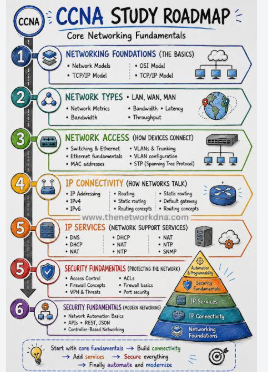
Step-by-Step Roadmap to Become an IT Support Engineer
Step 1: Learn Computer Fundamentals
Understand computer hardware, operating systems, software installation, and basic troubleshooting.
Step 2: Practise Windows Troubleshooting
Create a practice environment and learn how to resolve common Windows errors, driver issues, slow performance, and software problems.
Step 3: Study Networking Basics
Practise IP configuration, DNS troubleshooting, connectivity testing, and router and switch fundamentals.
Step 4: Learn Server Administration
Understand how organizations manage users and computers through Windows Server and Active Directory.
Step 5: Build a Home Lab
Use a spare computer or suitable virtual machines to practise operating system installation, networking, user management, and troubleshooting.
Only test systems and networks you own or have permission to use.
Step 6: Prepare Your Resume
Highlight your technical skills, lab exercises, projects, certifications, and any relevant internship experience.
Do not claim professional experience or certifications you have not earned.
Step 7: Practise Interview Questions
Prepare for questions about hardware, Windows, networking, DNS, DHCP, Active Directory, and real-world troubleshooting scenarios.
Apply for suitable entry-level roles and keep improving your practical skills.
Common IT Support Engineer Interview Questions
1. What is an IP address?
An IP address is a numerical address used to identify a device on an IP network.
2. What is DNS?
DNS, or Domain Name System, translates domain names into IP addresses so devices can locate network services.
3. What is DHCP?
DHCP automatically provides IP configuration to devices on a network.
4. What would you do if a computer had no internet connection?
Check the physical or Wi-Fi connection, verify IP configuration, test the default gateway, check DNS resolution, and investigate the issue systematically.
5. What is Active Directory?
Active Directory Domain Services is a Microsoft directory service used to manage users, computers, groups, and access within a Windows domain environment.
Career Opportunities After Learning IT Support
Depending on your skills and experience, you can explore roles such as:
- IT Support Engineer
- Desktop Support Engineer
- Helpdesk Executive
- Service Desk Analyst
- Technical Support Executive
- Junior System Administrator
- Network Support Engineer
Your next career step may involve Windows Server administration, networking, cloud computing, cybersecurity, or infrastructure management.
Why Practical Learning Matters
Reading technical concepts is important, but practical experience helps you understand how problems occur and how to solve them.
Practise configuring systems, troubleshooting network connectivity, managing user accounts, and documenting technical issues. Build small projects that demonstrate your ability to diagnose and resolve problems.
Global SkillTech offers IT learning programs covering areas such as networking, cloud computing, cybersecurity, Windows Server administration, and Linux. Explore the available programs to identify a learning path that matches your goals.
Conclusion
Becoming an IT Support Engineer starts with learning computer fundamentals, Windows, networking, and troubleshooting. Consistent hands-on practice, communication skills, and interview preparation can help you work toward an entry-level IT support position.
Start with the basics, practise regularly, build a small technical portfolio, and continue developing your skills as technology evolves.
Ready to start your IT career?
Explore IT courses at Global SkillTech and take the next step toward building your technical knowledge.
Website: https://globalskilltech.in/
Frequently Asked Questions
Can a beginner become an IT Support Engineer?
Yes. Beginners can work toward entry-level IT support roles by learning computer fundamentals, Windows, networking, and troubleshooting.
Do I need a degree to become an IT Support Engineer?
Requirements vary by employer. Some positions accept candidates with relevant technical skills, certifications, diplomas, or practical experience, while others require a degree.
Is networking important for IT support?
Yes. Networking fundamentals help IT support professionals diagnose connectivity, IP configuration, DNS, and other common issues.
Which skills should I learn first?
Start with computer hardware, Windows, basic networking, software installation, and troubleshooting. Progress to Windows Server, Active Directory, and Linux as your knowledge improves.
How can I practise IT support skills?
Use a practice computer or virtual machines, solve common technical problems, document each solution, and practise explaining your troubleshooting process.