
Trending IT Courses in 2026: What to Learn for High-Paying jobs

Every week, someone asks me the same question: “Which course should I do?”
It’s a fair question. Scroll through any learning platform and you’ll find hundreds of options, all promising a high-paying job in six months. Some deliver. Many don’t. The difference usually comes down to picking a skill that companies are actually hiring for, and then building something real with it.
So here’s a shortlist of trending IT courses in 2026, based on job demand, salary potential, and how long the skill is likely to stay relevant. No hype, just what’s worth your time and money.
Why IT skills still matter this year
Companies are spending on AI, moving systems to the cloud, and dealing with more cyber threats than ever. All three need people, and not just people with degrees.
Hiring has also shifted. Recruiters increasingly ask, “Can you do the work?” before they ask where you studied. A solid project portfolio can open doors that a certificate alone won’t.
That’s good news if you’re a fresher, a non-IT graduate, or someone thinking about a career switch.
How I picked these courses
I looked at four things:
- Job demand: are companies hiring for this right now?
- Salary potential: does it pay well at entry level and grow with experience?
- Learning curve: can a beginner realistically get job-ready?
- Staying power: will this skill still matter in five years?
Every course below passed at least three of those four.
The Trending IT Courses Worth Considering
- 1. Artificial Intelligence and Machine Learning

What it is: Teaching machines to learn from data and make predictions, like recommendation engines, fraud detection, and image recognition.
Why it’s in demand: Almost every industry now wants AI in its products, from banking to healthcare to retail.
Roles: ML Engineer, AI Engineer, Data Scientist.
Salary (India, approx.): ₹6–12 LPA at entry level, ₹20 LPA and above with experience.
Best for: People comfortable with maths, statistics, and Python. It’s tougher than most on this list, but the payoff is real.
2. Generative AI and Prompt Engineering
What it is: Building with tools like large language models, from chatbots and content tools to workflow automation.
Why it’s in demand: Businesses want people who can turn AI tools into working products, not just chat with them.
Roles: GenAI Developer, AI Automation Specialist, Prompt Engineer.
Salary (India, approx.): ₹6–14 LPA, and it varies a lot by company.
Best for: Developers, and also curious non-coders who are willing to learn Python. One honest warning: “prompt engineering” alone is a thin skill. Pair it with real development or domain knowledge.
3. Cloud Computing (AWS, Azure, GCP)
What it is: Running applications, storage, and databases on remote servers instead of company-owned hardware.
Why it’s in demand: Nearly every company has moved, or is moving, to the cloud.
Roles: Cloud Engineer, Solutions Architect, Cloud Administrator.
Salary (India, approx.): ₹5–10 LPA to start, ₹15–30 LPA at mid-level.
Best for: Freshers and working professionals alike. Start with one platform (AWS is the most common) and get certified.
4. Cybersecurity

What it is: Protecting systems, networks, and data from attacks.
Why it’s in demand: Breaches are expensive, and there’s a long-running shortage of skilled security people.
Roles: Security Analyst, Ethical Hacker, SOC Analyst.
Salary (India, approx.): ₹4–9 LPA at entry level, ₹12–25 LPA with experience.
Best for: Detail-oriented people who enjoy puzzles. You’ll need networking basics first.
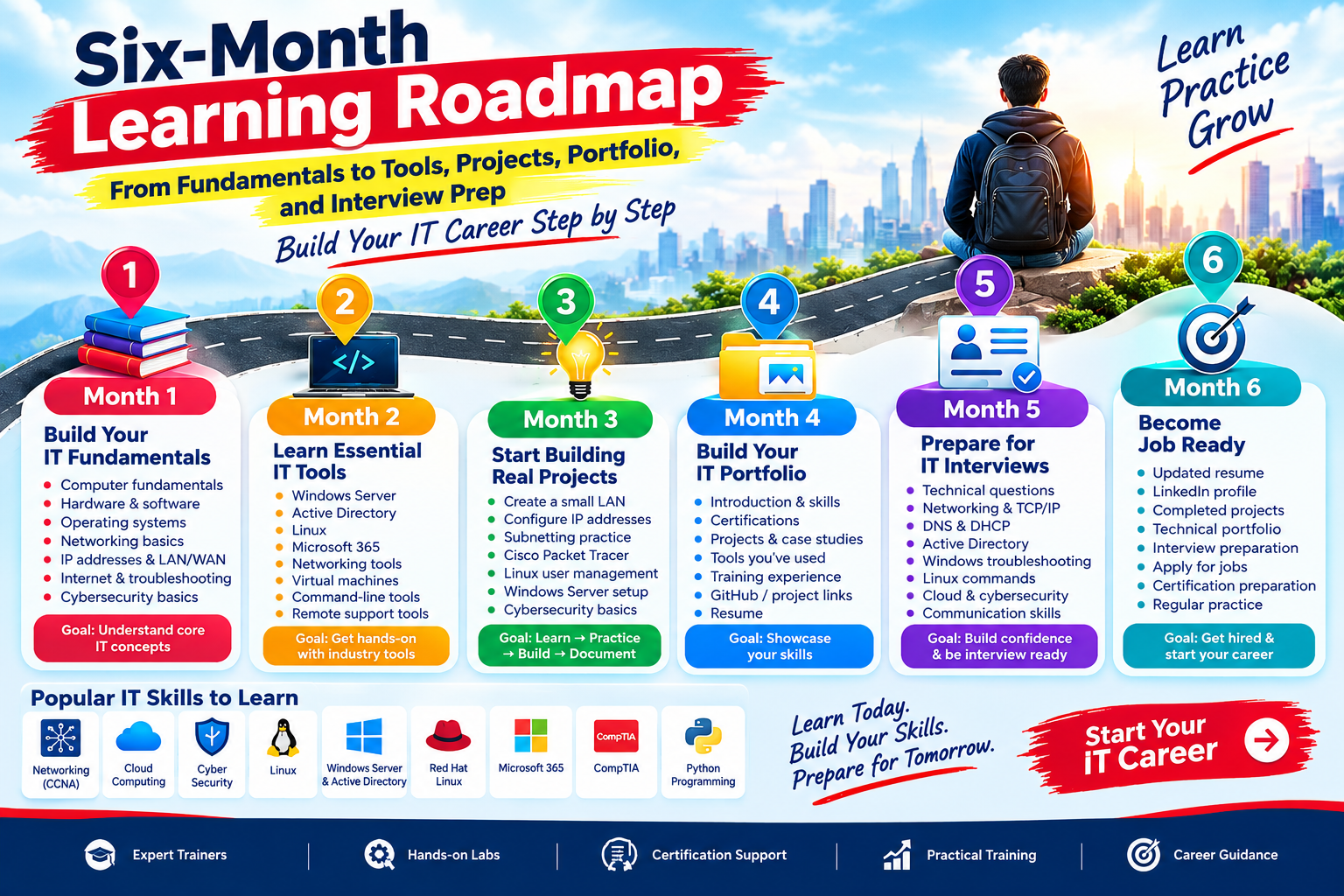
Six-Month Learning Roadmap to Start a Successful IT Career
Meta Description:
Follow this six-month IT learning roadmap to build strong fundamentals, learn essential tools, complete projects, create a portfolio, prepare for interviews, and start your IT career.
Focus Keywords:
IT career roadmap, six month IT learning roadmap, IT courses after 12th, how to start IT career, IT skills for beginners, networking course, cloud computing, cybersecurity, Linux, Python
Introduction
Starting a career in IT can feel confusing, especially when you don't know what to learn first, which tools to practice, or how to prepare for an IT job.
The good news is that you don't need to learn everything at once. A structured learning plan can help you move from basic computer knowledge to practical IT skills step by step.
This six-month IT learning roadmap is designed for beginners, students, fresh graduates, and anyone who wants to build a career in the technology industry.
The roadmap focuses on six important stages:
Fundamentals → Tools → Projects → Portfolio → Interview Preparation → Job Readiness
Month 1: Build Your IT Fundamentals
The first month should focus on understanding the basics.
Before learning advanced technologies, you should understand how computers, operating systems, networks, and applications work.
Topics to Learn
-
Computer fundamentals
-
Hardware and software
-
Operating systems
-
Windows basics
-
Basic networking concepts
-
IP addresses
-
LAN and WAN
-
Internet fundamentals
-
Basic troubleshooting
-
Cybersecurity basics
Goal of Month 1
By the end of the first month, you should be comfortable with basic computer and IT concepts.
Tip: Don't just memorize definitions. Try to understand how these concepts work in real-world situations.
Month 2: Learn Essential IT Tools
Once your fundamentals are clear, start learning the tools used by IT professionals.
Depending on your career interest, you can begin with:
-
Windows Server
-
Active Directory
-
Linux
-
Microsoft 365
-
Networking tools
-
Virtual machines
-
Basic command-line tools
-
Remote support tools
For students interested in networking, CCNA concepts can provide a strong foundation.
For students interested in cloud or cybersecurity, understanding networking and Linux is extremely useful.
Month 3: Start Building Real Projects
Learning theory is important, but projects help you understand how IT works in practical situations.
During the third month, start creating small projects.
Beginner Project Ideas
Networking
-
Create a small LAN
-
Configure IP addresses
-
Practice subnetting
-
Configure a basic network using Cisco Packet Tracer
Linux
-
Create users
-
Manage permissions
-
Configure services
-
Practice Linux commands
Windows Server
-
Create users in Active Directory
-
Configure groups
-
Manage permissions
-
Practice basic domain administration
Cybersecurity
-
Study common cyber threats
-
Practice basic security configurations
-
Learn about passwords, authentication and access control
The objective is simple:
Learn → Practice → Build → Document
Month 4: Build Your IT Portfolio
By the fourth month, you should have some practical work to show.
Create a simple portfolio that includes:
-
Your introduction
-
Technical skills
-
Certifications
-
Projects
-
Tools you have worked with
-
Training experience
-
GitHub or project links
-
Resume
A portfolio gives employers a better understanding of what you can actually do.
Instead of simply writing:
"I know networking."
You can show:
"I created and configured a simulated network using Cisco Packet Tracer and documented the configuration."
That makes your profile much stronger.
Month 5: Prepare for IT Interviews
Now it's time to prepare for job interviews.
Focus on both technical questions and communication skills.
Important Interview Topics
-
Computer fundamentals
-
Networking
-
TCP/IP
-
DNS
-
DHCP
-
Active Directory
-
Windows troubleshooting
-
Linux commands
-
Cloud fundamentals
-
Cybersecurity basics
-
Hardware troubleshooting
-
Technical support scenarios
Also practice explaining your projects.
For example:
Interviewer: Tell me about your networking project.
You should be able to clearly explain:
-
What you built
-
Which tools you used
-
What problem you solved
-
What you learned
-
How you troubleshot issues
Month 6: Become Job Ready
The final month is about putting everything together.
Your Job-Ready Checklist
✅ Updated resume
✅ LinkedIn profile
✅ Technical portfolio
✅ Completed projects
✅ Interview preparation
✅ Communication practice
✅ Job applications
✅ Certification preparation
✅ Regular technical practice
Start applying for suitable entry-level roles such as:
-
IT Support Executive
-
Desktop Support Engineer
-
Network Support Engineer
-
Technical Support Executive
-
System Support Executive
-
Junior Network Engineer
-
IT Help Desk Executive
-
Junior Linux Administrator
Which IT Skills Should Beginners Learn?
You don't need to learn every technology.
Choose skills according to your career goal.
| Career Interest | Skills to Start |
|---|---|
| Networking | CCNA, TCP/IP, Cisco, Troubleshooting |
| Cloud | Networking, Linux, Cloud Fundamentals |
| Cybersecurity | Networking, Linux, Security Fundamentals |
| IT Support | Hardware, Windows, Networking, Troubleshooting |
| System Administration | Windows Server, Active Directory, Linux |
| Programming | Python, Programming Fundamentals |
Why Practical Learning Matters
One of the biggest mistakes beginners make is spending too much time watching tutorials without practicing.
A better approach is:
Learn → Practice → Build Projects → Document → Improve
For example, after learning about IP addressing, don't stop at theory. Create a small network and practice assigning IP addresses.
This type of practical learning can improve your confidence and technical understanding.
Start Your IT Career With Global SkillTech
At Global SkillTech, learners can develop practical IT skills through career-focused training in areas such as:
-
CCNA Networking
-
Cloud Computing
-
Cyber Security
-
Linux
-
Windows Server & Active Directory
-
Red Hat Linux
-
Microsoft 365
-
CompTIA
-
Python Programming
The goal is to help learners understand technology through learning, practice and real-world projects.
Final Thoughts
Building an IT career doesn't happen overnight.
You don't need to become an expert in six months. Instead, use these six months to build a strong foundation, develop practical skills, create projects, prepare for interviews and become job-ready.